Artificial Intelligence is reshaping the Software Development Lifecycle!
By Abishek Anthony
April 8, 2026 • 19min read
AI-Driven Development: No shit, Sherlock! 🚀
What is AI in the Software Development Lifecycle (SDLC)?
AI in SDLC is a system that can assist the following roles:
- Developers in writing, reviewing, and testing code
- Quality Assurance Engineers in generating test cases and automating testing processes
- DevOps Engineers in automating deployment and monitoring tasks
- Project Managers in tracking progress and managing resources
- Business Analysts in gathering and analyzing requirements
- UX Designers in creating user interfaces and experiences
- Technical Writers in generating documentation
- Security Analysts in identifying vulnerabilities and suggesting fixes
- Data Scientists in analyzing data and generating insights
You got the idea..
How it works
All of this is only possible because AI models have been trained on vast amounts of code from public repositories, documentation, and other resources. Today, various AI models are available—such as GPT-*, Claude, and Gemini—each with its own strengths and weaknesses. Additionally, the context provided, as you may already know, is crucial for generating output of high quality.
💩 Shit In Shit Out
Quality is one key aspect in Software Engineering—the same applies to AI. If you provide 💩 input, you will most certainly get 💩 output.
✅ So let’s be mindful and avoid Shit In Shit Out!
If this statement is unfamiliar to you and you have never tried any kind of AI application or agent:
- ⏸️ Immediately pause reading the article here.
- 👆🏾 Play around with any AI tool of your choice.
- 💭 Make up your own picture about what AI is.
🤔 What are the capabilities and limitations of using AI?
As you might have realized…
- Modern AI excels at: natural language understanding, pattern recognition, and automating repetitive tasks
- Current limitations: AI lacks intrinsic accountability, is susceptible to hallucinations, and depends heavily on data quality
With these preconditions and knowledge about AI, we can transform this tool into one capable of performing tasks that typically require Human Intelligence (HI).
Deterministic vs. Probabilistic
If you consider what Spring Boot or Angular actually are, the answer becomes obvious. They are opinionated and deterministic frameworks, designed by engineers for engineers. Their rules, conventions, and constraints define the entire project structure so that:
- builds are reproducible,
- behavior is predictable,
- and the output is identical on any machine—for both backends and UIs.
This determinism is what enables software to scale across teams, environments, and years.
AI is probabilistic by nature. It produces likely outputs, not guaranteed ones. Our software systems or even the product it-self requires determinism to ensure reliability, maintainability, and security.
That is why AI must operate within deterministic systems, rather than replace them.
How Context Adds Determinism in the AI World
As I mentioned earlier, context is important for getting high-quality output from AI.
In a small experiment, I developed a Gym Diary App to track one’s gym progress using the following AI models and tools:
- Without context: ChatGPT which does not have access to my project codebase
- With context: GitHub Copilot, used as an IDE extension and had access to the entire project codebase
- AI-native IDE: Cursor Desktop, providing a full IDE experience with AI agents
The results were quite interesting:
| AI Tool / Model | Context Access | Output Quality |
|---|---|---|
| ChatGPT | None | Low |
| GitHub Copilot | Project Codebase | Medium |
| Cursor Desktop | Full IDE Experience | High |
I used the tools above to generate code for a simple feature, as described below:
Add a new endpoint to fetch gym diary details by category for a specific user.
No Context - ChatGPT
No matter which ChatGPT model I chose, the output was similar:
- It generated code snippets that were syntactically correct but did not align with the project’s architecture or coding standards.
- It missed important details such as error handling, logging, security considerations, database setup and more.
- e.g. Example ChatGPT output (without context):
To add a new endpoint to fetch gym diary details by category for a specific user in a Spring Boot + Kotlin application, we need to define:
- Controller endpoint
- Service method
- Repository query
Here’s a clean and maintainable approach: […]
Basically, it started generating code right away, without any prior knowledge of the project. Providing context to ChatGPT could have improved the quality of the output, but the effort didn’t always seem worth it, since sometimes I was faster writing the code by myself.
With Context - GitHub Copilot / Cursor Desktop
Compared to ChatGPT, agentic AI tools like GitHub Copilot and Cursor Desktop were game changers:
- GitHub Copilot, with access to the project codebase, produced code that was better aligned with the project’s architecture and coding standards.
- Cursor Desktop, with its full IDE experience, generated code that was not only correct but also well-integrated into the existing codebase, following best practices and conventions which already existed in the project.
To make these tools work, you need to configure them properly so they understand the project architecture, coding standards, and other relevant details.
Ok, but how do you use AI in the SDLC?
To effectively integrate AI into the Software Development Lifecycle (SDLC), I developed my own approach: AI-Driven Development (AIDD).
AIDD is not an industry-standard term—it’s my own methodology, born from hands-on experience in both greenfield and brownfield projects. It describes a structured approach to leveraging AI tools to augment human capabilities throughout the software development process.
Let’s take a look at the AIDD Hourglass Strategy.
⏳ The AIDD Hourglass Strategy (Test Gate)
AI is able to quickly generate code that aligns with the project—if the right context is provided. Generating code is one thing, but ensuring its quality and reliability is another. So yes, we need tests! And AI can help us here as well.
These kind of tests are typically Unit Tests, ensuring that each Unit (however you define a Unit in your codespace) works as expected. As we often discuss in Software Engineering, what Unit Tests are, the definition of it should be explicitly stated in your project guidelines or agreed upon by your team. Later, AI can follow these guidelines when generating new Unit Tests. The same can be applied to Integration Tests, Acceptance Tests, and E2E Tests.
The risk of generating code and tests with AI is that they might not align with the overall architecture, non-functional requirements, or even meet the actual business requirements. To close this gap, we need to add documentation about the architecture and other guidelines as markdown files within the project, and introduce a Test Gate: AIDD Hourglass Strategy.
In the AIDD Hourglass Strategy as illustrated below, the testing and development lifecycle follows an Hourglass shape to balance Human Intelligence (HI) and Artificial Intelligence (AI).
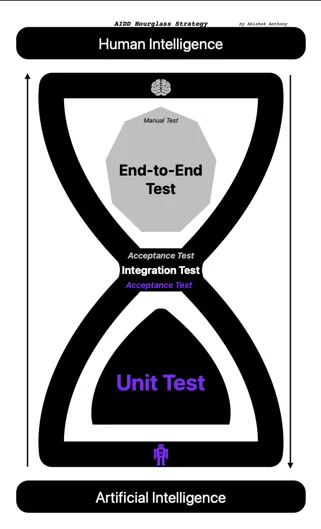
The Hourglass Model has three parts—a lower bulb, a neck, and an upper bulb—which we’ll explore in detail in the following sections.
1. Lower Bulb — AI Base: High-Volume Unit Testing
- Focus: Unit Tests
- AI’s Role: AI is highly efficient at generating repetitive test scaffolding and covering edge cases for discrete functions
- Benefit: It reduces the “toil” of writing tests manually, enabling faster feedback cycles
2. Neck — Integration & Acceptance
- Focus: Integration and Acceptance Tests
- The Hand-off: This is where AI-generated code meets human-designed architecture. Humans must validate architectural boundaries and ensure non-functional requirements are met
3. Upper Bulb — The HI Peak: E2E and Manual Testing
- Focus: E2E-Tests and Manual-Tests
- HI’s Role: Humans are essential for assessing user experience, business context, and “true intent”—areas where AI falls short.
- Future Potential: As AI models advance, they are likely to assume greater responsibilities once we establish an efficient way to provide them with sufficient business context.
The Hourglass Model in Practice
This Hourglass model is exactly what I experienced in my GymDiary project as well.
The GymDiary project was initially built without any AI assistance. When I introduced AI to generate code and tests, I observed the following:
- Unit Tests: AI-generated unit tests were comprehensive, covering many edge cases, significantly reducing the time spent on writing tests manually
- Integration Tests: The hands-off implementation required careful review to ensure that AI-generated code adhered to the business requirements. AI did not know how the downstream services were working, as it lacked the necessary context.
- E2E Tests: Even if the contract was validated at the Integration Test level, the E2E tests revealed gaps in user flows and business logic that AI could not anticipate. Some features did not work as expected because AI misunderstood the business requirements. The E2E tests ensured that the overall system worked as intended from a user’s perspective.
By using the contexts and the outputs of the generated tests as feedback loops in the AIDD workflow, you can ensure that AI-generated code meets the required quality standards and aligns with the overall architecture and business requirements. Not only tests, but also reviews—by both HI and AI—can serve as feedback loops to improve the quality of AI-generated code. Last but not least, the requirement it-self can be used as a contextual artifact to ensure that the generated code meets the business needs.
Combining all these elements creates a full AIDD workflow which is depicted below.
🤖 The AIDD Workflow
DevOps Loop
A sustainable AIDD workflow integrates AI into the existing DevOps loop as an augmentation layer.
flowchart LR
    classDef ai fill:#e1f5fe,stroke:#01579b,stroke-width:2px,color:#01579b;
    classDef hi fill:#fff3e0,stroke:#e65100,stroke-width:2px,color:#e65100;
    classDef process fill:#cf5f5,stroke:#212121,stroke-width:2px;
    classDef boundary fill:none,stroke:#9e9e9e,stroke-dasharray: 5 5;

    Planning_Refinement["<b>PLANNING & REFINEMENT</b>"] --> Coding_Phase["<b>CODING & VALIDATION</b>"]
    Coding_Phase --> Ops_Phase["<b>RELEASE & MONITORING</b>"]
    Ops_Phase --> Planning_Refinement
Planning & Refinement
In this phase, AI assists in refining requirements by asking questions and generating plans, while humans ensure the integrity of the architecture.
    flowchart LR
        %% Global Styles
        classDef ai fill:#e1f5fe,stroke:#01579b,stroke-width:2px,color:#01579b;
        classDef hi fill:#fff3e0,stroke:#e65100,stroke-width:2px,color:#e65100;
        classDef process fill:#cf5f5,stroke:#212121,stroke-width:2px;
        classDef boundary fill:none,stroke:#9e9e9e,stroke-dasharray: 5 5;

        BusinessREQ([Requirement Initialized]):::process --> REQ

        subgraph Planning_Refinement ["<b>PLANNING & REFINEMENT</b>"]
            direction TB

            REQ[Product-Specific-Requirement]:::process --> AI_REF
            AI_REF{Refinement:<br/>AI + HI}:::hi --> QA
            QA[/Questions & Architecture Review/]:::hi ----> REQ
            AI_REF ---> PLAN[AI-generated Plan]:::ai
        end
Coding & Validation
AI generates code and documentation, with a Test Gate ensuring quality through reviews and tests performed by both AI and humans.
    flowchart LR
        %% Global Styles
        classDef ai fill:#e1f5fe,stroke:#01579b,stroke-width:2px,color:#01579b;
        classDef hi fill:#fff3e0,stroke:#e65100,stroke-width:2px,color:#e65100;
        classDef process fill:#cf5f5,stroke:#212121,stroke-width:2px;
        classDef boundary fill:none,stroke:#9e9e9e,stroke-dasharray: 5 5;

        subgraph Coding_Phase ["<b>CODING & VALIDATION</b>"]
            direction TB

            PLAN["AI-generated Plan"]:::ai --> AI_CODE[[AI-generated Code & Documentation]]:::ai
            AI_CODE -- Feedback --> PLAN
            PLAN --> Test{Test Gate}:::process
        %% Feedback Loops
            Test -- TDD/BDD ---> AI_CODE
            AI_CODE --> AI_REVIEW(Review by AI):::ai
            AI_CODE --> HI_REVIEW(Review by HI):::hi
            AI_REVIEW -- Feedback --> AI_CODE
            HI_REVIEW -- Feedback --> AI_CODE
            AI_REVIEW -- Review / Extend --> Test
            HI_REVIEW -- Review / Extend--> Test
        end
Release & Monitoring
The deployment and monitoring phase benefits from AI augmentation in several key areas:
AI-Enhanced Release Notes
Instead of manually writing release notes, AI can analyze the git diff between releases and generate comprehensive, human-readable changelogs. This ensures that no change goes undocumented and frees engineers to focus on highlighting business-critical updates.
AI-Assisted Log Analysis
When production issues arise, AI can analyze logs and provide engineers with a likely root cause and a suggested fix. Rather than sifting through thousands of log lines, you provide the relevant logs to an AI agent, which returns a concise explanation of the issue and actionable next steps.
Autonomous Ticket Resolution
For non-critical issues—such as minor configuration changes, dependency bumps, or well-understood bug patterns—AI can resolve tickets autonomously. The key constraint: only tickets that are not marked as critical should be delegated, and a human must review the resolution before it reaches production.
AI-Driven Impact Analysis in CI/CD
AI can analyze pull requests and predict the blast radius of a change, flagging risky deployments before they reach production. This adds a safety net to the CI/CD pipeline without slowing it down.
AI-Powered Production Observability
Beyond reactive log analysis, specialized AI agents can continuously monitor production systems to detect patterns that humans would miss:
- Security threat detection: An AI agent trained on your system’s baseline behavior can identify anomalies that indicate an ongoing attack—unusual request patterns, privilege escalation attempts, or data exfiltration signals—and alert your team in real time.
- Failure trend prediction: AI can correlate metrics across services to spot trends heading toward failure before they cause an outage. Instead of reacting to a 3 AM incident, you get a warning hours earlier: “Service X error rate is climbing at 2% per hour—likely cause: connection pool exhaustion in downstream dependency Y.”
Monitoring AI Tools Themselves
One aspect that is often overlooked: we also need to monitor the AI tools we use. How many tokens are consumed per task? What is the cost-to-value ratio for different levels of task complexity? Can prompts or context be optimized to reduce token usage without sacrificing output quality? Tracking these metrics helps teams understand where AI delivers real ROI and where it’s burning budget on tasks a human could handle faster.
What Doesn’t Change
It’s worth stating explicitly: the deployment process itself stays the same. Kubernetes clusters, CI/CD pipelines, GitOps workflows, infrastructure-as-code—none of these DevOps principles go away. AI doesn’t replace your deployment infrastructure; it adds an observability and automation layer on top of it.
Despite these capabilities, the Release & Monitoring phase remains human-governed. AI provides insights and automates routine tasks, but engineers own the deployment decisions and incident response.
All in all, it’s just an augmentation layer on top of the existing DevOps processes.
Yes, now you would say this sounds great, but how do we ensure that the generated code meets the actual business requirements? Spec-Driven Development (SDD) is the answer.
Spec-Driven Development (SDD) in AIDD
Spec-Driven Development (SDD) is a methodology where structured specifications—written as Markdown files within the repository—serve as the primary source of truth for extending software deterministically using AI. The specification constrains a probabilistic AI model to produce deterministic, predictable output.
TDD → BDD → SDD: Concentric Circles
To understand where SDD fits, think of three concentric circles:
- Test-Driven Development (TDD) is the innermost circle, focusing on the core of the software—the code itself. You write a failing test, implement the code, and refine.
- Behavior-Driven Development (BDD) surrounds TDD. It bridges the gap to business by defining how the system behaves using structured scenarios (e.g., Gherkin). Business stakeholders know the system behavior and extend test cases at this level.
- Spec-Driven Development (SDD) is the outermost circle. It goes beyond individual behaviors and captures the full specification of a feature or system—architecture, constraints, acceptance criteria, and context—in a format that both humans and AI can consume.
Each methodology exists independently. You don’t need BDD to practice SDD, just as you don’t need TDD to practice BDD. But when layered together, they form a comprehensive development strategy where every level—code, behavior, and specification—is covered.
Why SDD Matters for AI
Remember the Deterministic vs. Probabilistic distinction from earlier in this article? This is where it comes full circle.
AI models are probabilistic—they produce likely outputs, not guaranteed ones. But our software systems require determinism. SDD bridges this gap: a well-written specification acts as a deterministic constraint on a probabilistic system. The better the spec, the more predictable and reliable the AI-generated output becomes.
There is an ongoing thesis that AI is capable of creating full software just using specifications. The reality in 2026 is different: AI makes developers more efficient, not redundant. But the direction is clear—the better your specifications, the more work you can reliably delegate to AI. SDD is the methodology that makes this delegation structured and repeatable.
The SDD Workflow
In practice, SDD follows a cyclical workflow:
    flowchart LR
        subgraph Spec-Driven-Development
            Understand["Understand Specification"] --"Create a"--> Plan["Plan with AI Agents"]
            Plan --"used as a guide to"--> Develop["Generate Code & Tests"]
            Develop --"which is"--> Verify["Verify against Specification"]
            Verify --"provide Feedback to AI"--> Understand
        end
In my GymDiary project, I used AI to generate specifications based on the initial requirements, saved them as Markdown files in the repository, and used those specifications to guide AI in generating code and tests. To ensure AI can understand specifications, they need to be written in a clear and structured format—such as Markdown—and provided to the AI model as context. All this falls into the first phase of the AIDD workflow: Planning & Refinement.
One problem that will arise here is the quality of the specifications and their maintenance over time. Can this be solved with MCP Servers or Retrieval-Augmented Generation (RAG) techniques—or do we need to invent a completely new approach?
What’s Next: SDD in Depth
SDD deserves a deeper treatment than I can give it here. I’m currently applying this approach hands-on in a brownfield project at a customer, building on my earlier greenfield experience with the GymDiary app. The combination of both contexts—legacy constraints vs. clean-slate freedom—is revealing patterns that I believe are worth a dedicated article.
📌 Stay tuned for Part 2, where I’ll dive deep into Spec-Driven Development: a concrete worked example from specification to generated code, the tooling required to make it work, and how SDD evolves the relationship between human engineers and AI agents.
📝 Conclusion: You Are the Quality Gate
Let me be blunt: don’t think AI will do all the work for you.
AI is a tool you delegate work to—not a colleague you hand responsibility to. You prompt it, it drafts. You review, you decide, you ship. The generated artifacts—code, documentation, products—are your responsibility.
In this world, the engineer’s role shifts from writing everything to governing everything. You are the quality gate. You ensure that AI-generated output meets the architecture, the business requirements, and the standards your team agreed on. That requires more judgment, not less.
So here’s what I’d challenge you to do:
- Invest in your project’s context layer—rules files, architecture decision records, coding guidelines as Markdown. The better your context, the better AI performs.
- Treat AI output as a draft, never as a deliverable. Review it like you’d review a junior developer’s pull request.
- Establish a Test Gate using the Hourglass Strategy. Let AI generate the volume, but humans validate the intent.
AI is not replacing developers—it is enabling them. But engineers who leverage AI effectively will outperform those who don’t, and those who blindly trust it will ship the bugs that prove why human judgment still matters.
What are your thoughts and experiences on this topic?